

If you follow r/msp or IT infrastructure forums, you’ve probably seen this question pop up frequently:
“Which HR apps actually handle IT onboarding and offboarding across all our SaaS tools?”
The honest answer from seasoned SysAdmins? None of them.
HR software like BambooHR, HiBob, or Sage HR handles the HR side of Joiners, Movers, and Leavers (JML) well. They can easily trigger an offboarding event to disable a main account in Microsoft 365 or Google Workspace. But when it comes to the long tail of 20+ other web apps used across marketing, sales, finance, and dev, HR tools leave a massive gap.
This leads to orphaned accounts, active ex-employee logins, phantom SaaS spending, and severe security blind spots.
Below is a breakdown of the 5 most common ways IT teams and MSPs handle SaaS Lifecycle Management (LCM) and offboarding, along with the pros, cons, and realistic limitations of each.
1. HRIS-to-IdP Direct Triggers (The Standard 50% Solution)
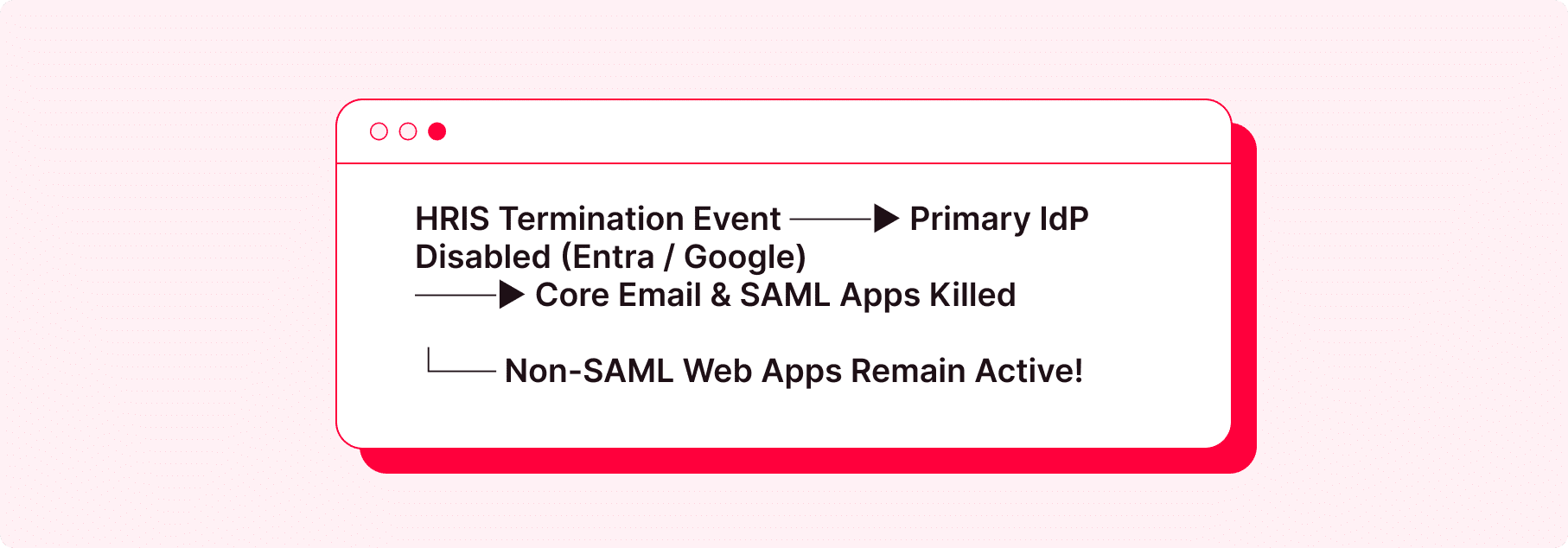
How it works: You connect your HR system (HiBob, BambooHR, Rippling) directly to your primary Identity Provider (IdP) like Entra ID (Azure AD), Google Workspace, or Okta. When HR marks an employee as terminated, the IdP instantly disables their email and core identity.
- Pros: Automated, instant, and native. Perfect for revoking access to main corporate accounts and email.
- Cons: It only covers about 50% of the SaaS stack. Any web app that doesn’t use standard SAML SSO or sits outside the central IdP remains completely untouched and active.
2. API-Based SCIM Provisioning (The “Enterprise Tax” Route)
How it works: System for Cross-domain Identity Management (SCIM) is the traditional API protocol used by Identity Governance and Administration (IGA) tools to automate Lifecycle Management. When a user is disabled in your IdP, SCIM fires an API call to delete or suspend their user account inside the target SaaS app.
- Pros: True automated LCM. Account creation, role updates, and account deprovisioning happen automatically via API.
- Cons: The “Enterprise Tax.” Most SaaS vendors lock SCIM APIs behind expensive $30+/user/month Enterprise tiers. For SMBs and growing teams, paying 3x the price per user across dozens of apps just to gain automated API offboarding is financially impractical.
3. Custom PowerShell, Graph API, & Power Automate Scripts (The DIY Way)
How it works: IT admins write custom PowerShell scripts using Microsoft Graph API, Python scripts, or Power Automate workflows. When an offboarding ticket is created, the script disables the primary account, revokes active sessions, converts the mailbox to shared, reclaims licenses, and attempts to trigger webhook calls to secondary systems.
- Pros: Highly customizable to your exact operational workflow without extra software subscription costs.
- Cons: Extremely fragile. Custom scripts break whenever vendor APIs update. They also require constant maintenance across multiple tenant environments, and cannot touch web apps that lack public APIs altogether.
4. Manual Offboarding Checklists & Access Audits (The Brute-Force Method)
How it works: The traditional approach – when someone leaves, an IT technician opens a checklist and manually logs into 15 to 30 separate web portals on a Friday afternoon to click “Delete User” or “Revoke Access.”
- Pros: Zero added software costs.
- Cons: High human error rate. It takes hours, admins routinely forget minor portals or secondary logins, and ex-employees often retain active access for days, weeks, or months post-departure.
5. Session-Level SaaS Lifecycle Management (LCM)
How it works: Traditional LCM tools rely on SCIM APIs, which hits the “Enterprise Tax” wall. Unixi solves this by delivering Automated Lifecycle Management (LCM) at the user session level.
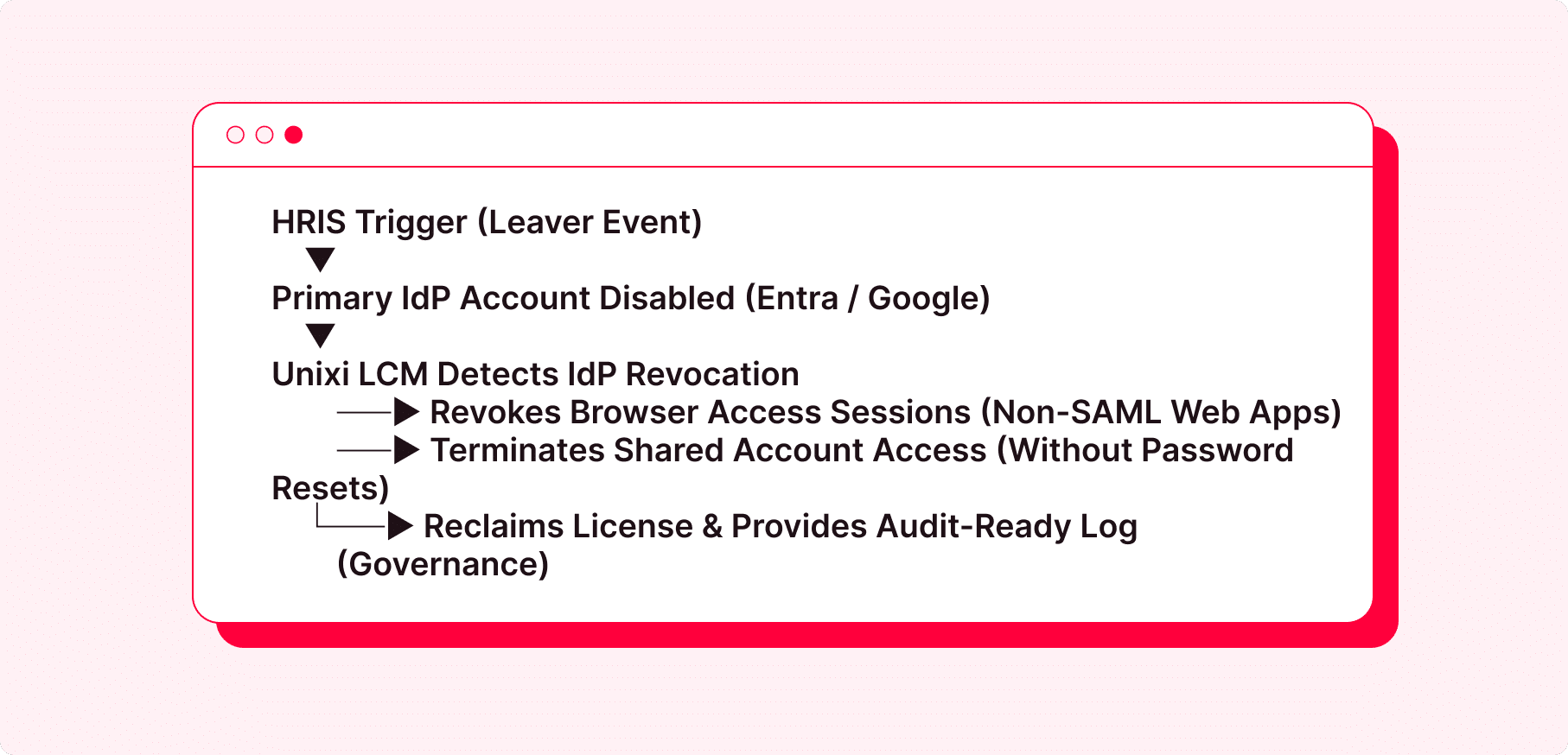
By running an intelligent governance agent at the browser layer, Unixi hooks directly into every app your users are using to control user provisioning, active sessions, and deprovisioning across your web applications, including non-SCIM apps, shadow IT, and shared team logins – all based on the rules you set in your primary IdP (Entra ID, Google, Okta) or HRIS system.
Pros:
- Complete LCM Coverage: Automates user offboarding across both standard SAML apps and the 50–80% of unmanaged web apps that lack SCIM APIs.
- Bypasses the “Enterprise Tax”: Provides enterprise-grade deprovisioning and license reclamation on standard, non-enterprise app subscription tiers.
- Zero Password Residuals: Because credentials are abstracted via zero-knowledge Key Derived Authentication (KDA) and never exposed or stored locally, offboarding a user immediately cuts access without needing to manually reset passwords on shared portals.
Cons:
- Requires enforcing the managed browser extension across corporate endpoints.
The Verdict: How to Build a Fail-Safe Offboarding Flow
Don’t expect your HR app to be an all-in-one Identity Governance tool, it was never designed to manage application lifecycles. The most efficient architecture for modern IT teams and MSPs looks like this:
- HRIS (Source of Truth): Owns employee status and departure dates.
- Primary IdP (Entra ID / Google Workspace): Owns the primary identity trigger.
- Session-Based Lifecycle Management (Unixi): Enforces automated LCM across the long tail of non-SCIM web apps, shadow SaaS, and shared logins without forcing expensive tier upgrades or manual checklists.
This three-layer architecture: HRIS as source of truth, IdP as primary trigger, and session-based LCM as the enforcement layer – closes the gap that HR software, SCIM, and manual checklists all leave open on their own.
Start a free trial to see how Unixi handles offboarding across your actual SaaS stack, or book a demo if you want a walkthrough of how it fits into your existing IdP and HRIS setup first.